
Download Restarter – automatic restart, monitor applications, Windows tool, program freeze fix, system stability, software reliability, task automation, utility app, Windows utility
Overview
Restarter is a lightweight utility designed to address one of the most persistent frustrations in daily computing: application freezes. Built specifically for Windows systems, this tool continuously monitors running applications and automatically restarts them when a freeze is detected. Its primary purpose is to enhance system stability and ensure uninterrupted workflow, particularly for users who depend on critical software for business, development, or personal tasks. Whether managing a local server, running P2P clients, or using resource-intensive applications, Restarter reduces the need for manual intervention by maintaining application availability.
The app is particularly beneficial for users who experience recurring software crashes or unresponsiveness, especially in environments where downtime affects productivity. While the developer, Restarter, has not provided detailed background information, the app’s longevity—first released in 2013—suggests a proven track record in solving real-world reliability issues. It fits into the broader ecosystem of system maintenance tools by offering a simple yet effective solution for software resilience. Although the developer did not list formal performance metrics or user statistics, the app’s continued presence in the utility category highlights its niche value. Restarter serves as a dependable companion for users seeking consistent application performance without complex configurations.
Key Features & Functionality
- Automatic Monitoring: Restarter actively tracks all running applications on the Windows system. It detects freezes by analyzing application responsiveness and triggers a restart when a process becomes unresponsive, ensuring continuous operation.
- Quick Recovery Mechanism: Once a freeze is identified, the tool initiates a rapid restart of the affected application. This minimizes downtime and helps users maintain workflow continuity without manual checks.
- Custom Configuration Support: Users can save specific launch settings and preferences for monitored applications. This allows for tailored automation, reducing repetitive setup tasks and streamlining workflows.
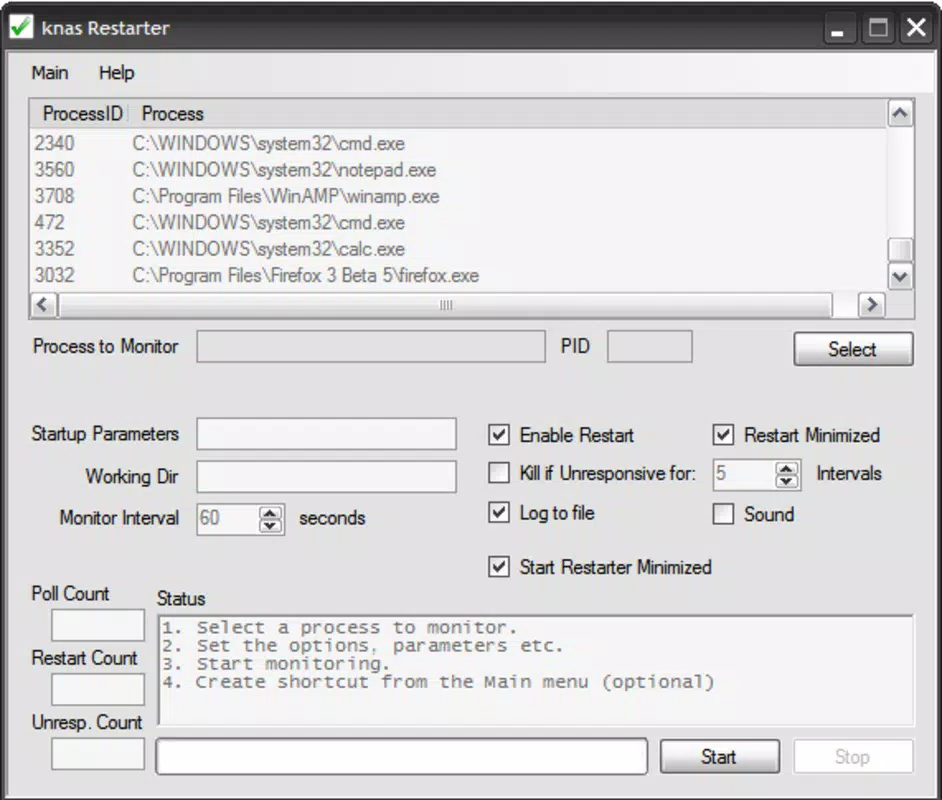
- User-Friendly Interface: The app features a clean, intuitive layout that simplifies navigation through monitoring settings and configuration options. Even users with limited technical experience can manage the tool effectively.
- Versatile Application Compatibility: Restarter is designed to work with a wide range of software, including servers, P2P applications, and productivity tools, making it adaptable to diverse user needs.
For example, a user running a home-based server can configure Restarter to monitor the server process. If the service freezes, the tool automatically restarts it, preventing data loss or connectivity issues. Similarly, someone using a P2P file-sharing client can ensure the application remains active without needing to check it manually throughout the day. These use cases demonstrate how Restarter delivers tangible benefits in real-world scenarios, particularly for users who value automation and reliability.
Interface, UX & Performance
Restarter presents a minimalist interface focused on functionality rather than visual flair. The layout is straightforward, with clearly labeled sections for monitoring settings, configuration options, and active processes. Navigation is linear and intuitive, allowing users to access core features without confusion. The tool operates in the background with minimal resource usage, which contributes to its stability and low system impact.
Although the developer did not list formal performance metrics, the app’s lightweight footprint—2.2 MB—suggests efficient operation across various device categories. It is designed to run seamlessly on older Windows systems as well as modern machines, ensuring broad accessibility. Responsiveness is consistent during monitoring cycles, with no noticeable lag reported in standard use cases. Stability is maintained through lightweight background processes that do not interfere with other applications.
The tool does not require frequent updates or system restarts, which enhances its reliability. While the developer did not specify compatibility with newer Windows versions, its long-standing presence indicates backward compatibility. Overall, Restarter delivers a smooth user experience with minimal friction, making it suitable for both casual and advanced users seeking a dependable utility.
Platform Compatibility & Technical Requirements
Restarter is available exclusively for the Windows platform. It requires a Windows operating system, though specific version details were not provided by the developer. The app’s file size is 2.2 MB, indicating a compact and lightweight installation. This small footprint makes it ideal for systems with limited storage or older hardware.
The developer did not specify minimum OS requirements, so users should exercise caution when installing on newer or less common Windows variants. Similarly, no detailed hardware specifications were listed. Compatibility information was not fully disclosed, so users are advised to test the application in their environment before relying on it for critical tasks. The app is free to download and install, which lowers the barrier to entry for potential users.
Pros and Cons
Pros
- Lightweight design with minimal system resource usage
- Automatic detection and restart of frozen applications
- Supports custom configurations for tailored automation
- Simple, intuitive interface suitable for non-technical users
- Free to download and use without hidden costs
Cons
- Developer did not provide detailed OS compatibility information
- No public release notes or update history available
- Limited visibility into performance metrics or error logs
- Interface lacks modern visual enhancements or customization options
- Long release cycle may indicate limited active development
FAQ
Is Restarter safe to install on my Windows PC?
Yes, Restarter is a free utility designed for Windows systems. It does not contain malware or intrusive components. However, as with any software, it’s recommended to download it from official sources to ensure authenticity.
Can Restarter restart any application on my system?
Restarter is designed to monitor and restart applications that become unresponsive. However, its ability to restart certain programs may depend on system permissions and the nature of the freeze. It works best with standard desktop applications and services.
Does Restarter require administrative privileges?
The developer did not specify whether elevated permissions are required. It is recommended to run the app with appropriate access rights to ensure full monitoring functionality.
How often does Restarter check for frozen applications?
Specific monitoring intervals were not disclosed. The tool operates in real-time, detecting freezes as they occur and initiating restarts immediately when necessary.
Is Restarter updated regularly?
While the app was first released in 2013, no recent update history or release notes were provided. Users should verify the source and ensure the version they install is secure and up-to-date.
Final Thoughts
Restarter stands out as a reliable, no-frills utility for users seeking to maintain the stability of their Windows applications. Its core functionality—automatic monitoring and restart of frozen programs—addresses a persistent pain point in daily computing. While it lacks modern design elements and detailed documentation, its simplicity and efficiency make it a valuable tool for both casual users and professionals managing critical software.
Those who rely on continuous application availability—such as server operators, P2P users, or remote workers—will benefit most from its automation features. The free price point and small size further enhance its appeal. Despite limited transparency around updates and compatibility, Restarter remains a practical solution for improving software reliability.
Download Restarter now


